
While creating E-Auction, both Reverse and Forward, Buyer users might need to apply different payment conditions for suppliers individually: eg. bonus or malus. With this new function, it is much easier now and takes next steps:
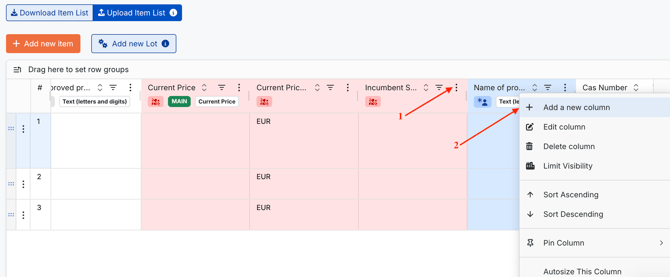
1. On Items tab, click Three Dot button next to any column name and select `Add a new column`.
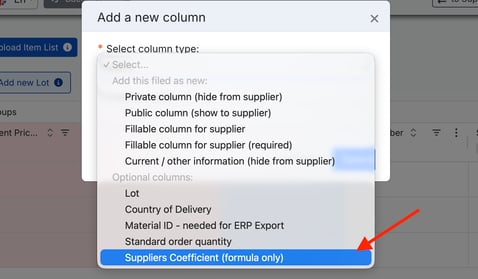
2. In a modal window click Select below `Select column type`, then choose Supplier Coefficient (formula only) in `Optional columns section`. Save the column.
After saving, the column will appear on Items tab as private. Click Save and Next step at the bottom of the page.
Please pay attention that setting up bonus/malus in this column is possible only after inviting suppliers.
3. Go to Suppliers tab and invite needed vendors. Make sure all the suppliers are successfully added to the event. Click Save and Next Step.
4. Go back to Item tab. Locate Supplier Coefficient column. Click on the empty box, select a supplier and insert needed value, which will influence Final Price. It will be calculated on percentage basics.
Bonus Calculation Example:
if you want to give 2% higher price as bonus to a supplier, insert 1.02:
Example: 100 EUR (Supplier Price) * 1.02 = 102 EUR
Malus Calculation Example:
If you want to give 2% lower price as malus to a supplier, insert 0.98 and click OK:
Example: 100 EUR (Supplier Price) * 0.98 = 98 EUR

5. After setting up all needed bonuses and maluses, create another formula column, which will calculate Final Price: Supplier Price per Unit * Supplier Coefficient. Mark this column as Main Price, so ranking will be based on this column calculations.

6. After everything is set up correctly and quotes are given, calculated final price can be checked on Bid History, Supplier Analysis and Pivot table tabs.
New Column `Supplier Coefficient` is designed to make the process of applying individual payment conditions per supplier within English E-Auctions effortless and effective.